Product

Office BoardEvery patient and every op on one wall TVFront deskCheckout flags, quick asks and who's availableOp tabletsCall the doctor with one tap, see every opDoctor screenA queue that sorts itself, and your next hourOffice chatRooms, messages and visit threads, encryptedAlertsWindows, phone and Watch alerts that reach the right personReportsVisit recaps, wait times and real appointment lengths

More

SecuritySetupPricingWhat's new
Start 30-day free trial Try the live demo
Home

Security

Your patients' data never leaves your building.

VisitPing installs on the Windows server that already runs Open Dental. There's no cloud copy of your schedule and nothing for us to lose.

Built in, not bolted on

The safeguards a HIPAA office expects.

Approve each screen NEW

Every TV, tablet and computer is approved once by an admin. An approved computer stays approved for every Windows user on it.

Audit log

Every settings change is in a tamper-evident log, kept 6 years.

Protected secrets

Stored passwords are encrypted with Windows' built-in protection.

Encrypted backups

Nightly encrypted backups to another drive or a network share.

Nothing about patients goes out

Notifications name the op, never the patient. License and update checks send only a random Install ID.

Health sharing you can see

Counts and statuses every 5 minutes so support can help early. Show the exact report, or turn it off.

  • Read-only connectionConnect with a MySQL user that can only read. VisitPing never changes an appointment, a status or a chart.
  • Encrypted on your networkScreens connect over HTTPS at your office's own address, like brookside.visitping.app, with a real certificate that renews by itself.
  • Screens talk only to your serverFonts, icons and the built-in GIFs come from your own server.
Screens talk only to your server. The license service never sees names, appointments or anything from Open Dental.
Sign-in and roles

Everyone signs in as themselves

Staff come straight from your Open Dental users.

  • A PIN, a badge tap, or a Microsoft or Google account. Only your own Workspace domain gets in
  • Access roles decide what each person can see and do, with patient information clearly marked
  • Roles stack for people with more than one job
  • Settings need your own sign-in plus a two-step code or passkey. No shared admin password
  • Shared screens lock after a time you choose
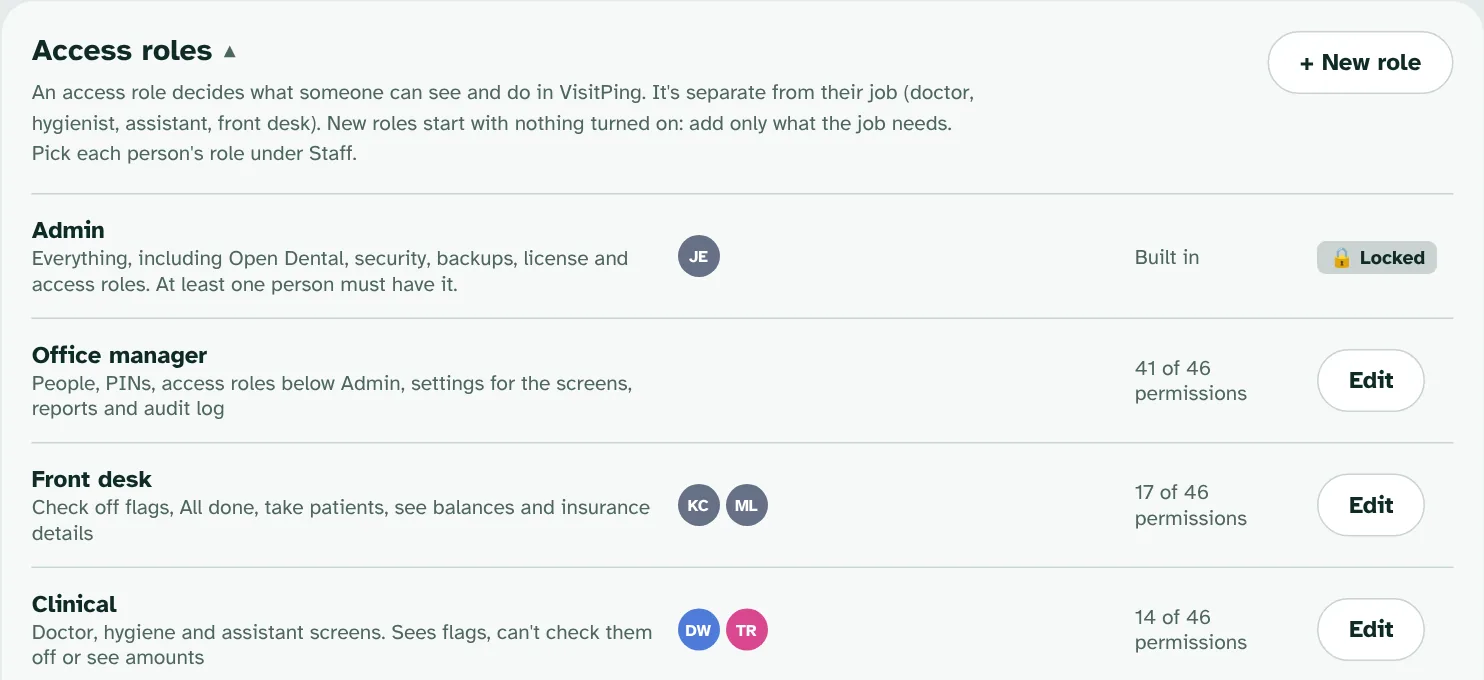
Access roles in Global settings: Admin, Office manager, Front desk and Clinical, with who has each one.

Ready when you are.

Every feature free for 30 days on your own Open Dental server. No card needed.

Start free trial