Product

Office BoardEvery patient and every op on one wall TVFront deskCheckout flags, quick asks and who's availableOp tabletsCall the doctor with one tap, see every opDoctor screenA queue that sorts itself, and your next hourOffice chatRooms, messages and visit threads, encryptedAlertsWindows, phone and Watch alerts that reach the right personReportsVisit recaps, wait times and real appointment lengths

More

SecuritySetupPricingWhat's new
Start 30-day free trial Try the live demo
Home

Office Board

The whole office, at a glance.

Made for a wall TV and readable across the room. Every patient who has checked in, every op and who is in it, and who is about to walk through the door, all from the statuses your team already sets in Open Dental.

Office Board with patients in On my way, Arrived, Paperwork, In bathroom and Ready to go back, and the ops list on the right with Op 1 turning over and Op 5 waiting on Ready for exam.
The Office Board. Sample patients from the Brookside Family Dental demo.
Columns

Your statuses become the board

Pick which Appt Confirmed statuses show as columns, in Open Dental's own order and colors.

  • On my way, Arrived, Paperwork, In bathroom, Ready to go back, or anything else you use
  • A patient leaves the board when they reach your "in the op" status or are marked seated
  • On my way columns count down to the appointment and then show late
  • Clinics: each screen can show one office
The Office Board as a wall display with a big clock, status columns, the ops list and the color key.
Cards

Cards that tell the story

Each card shows the patient, provider and op, with tags for what matters before they go back.

  • Family booked together, including super families
  • Premed and New patient straight from Open Dental
  • Dr + Hyg with both names, shown once
  • Early, LATE and SELF PAY
  • Cards count up from appointment time, then pulse and flash as the wait grows. You set the thresholds
Office Board with patients in On my way, Arrived, Paperwork, In bathroom and Ready to go back, and the ops list on the right with Op 1 turning over and Op 5 waiting on Ready for exam.
Ops

Every op, colored by provider

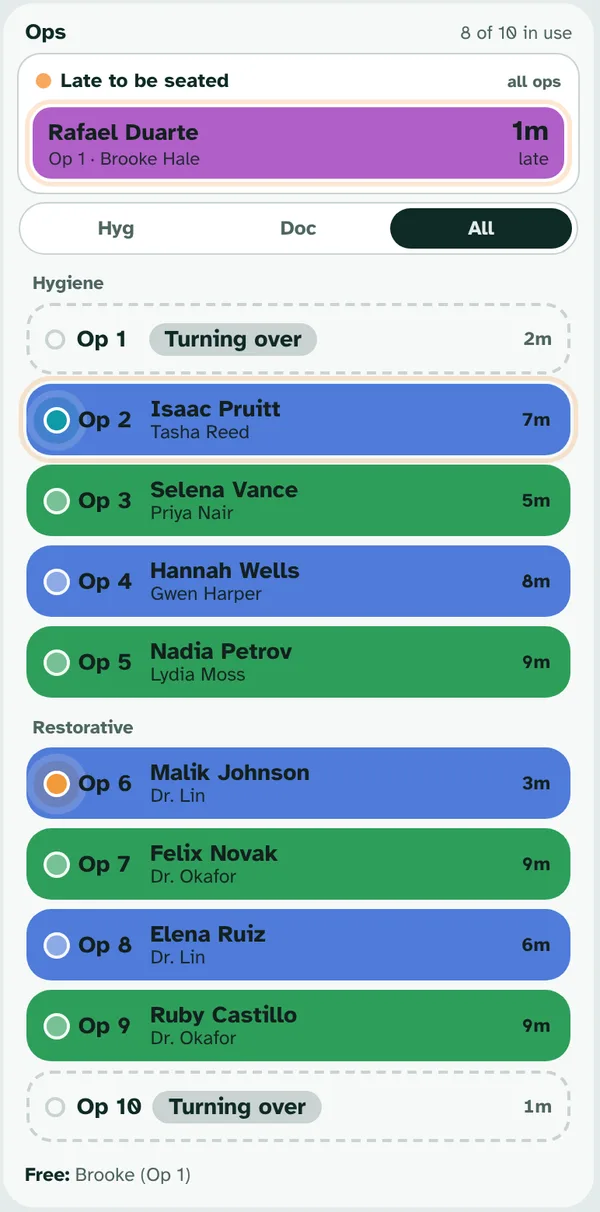
The ops list shows who is in each room and how long, and what each room is waiting on.

  • An op waiting on the doctor ripples in the request's color
  • Turning over shows how long since the patient left, so everyone sees which room opens next
  • A warning when a patient is marked in two rooms
  • Expected soon lists who is due in the next 10 minutes, with LATE until they check in
  • I'm on it from a wait alert shows right on the board
The Ops list: Late to be seated on top, then every hygiene and restorative op with the patient, the provider and the time, and two ops turning over.

Made for a wall

Big, calm and readable from across the room.

Big clock and color key

Wall displays show a big clock and an always-on color key.

Light and dark

Follows each device, with an override per screen for dim ops and bright lobbies.

Wall displays stay put

A TV set as a wall display shows the Office Board only, and the server gives it nothing else.

Works on a phone too

On phones the board switches to Patients and Ops tabs.

Ignored patients

Lunch and block patients stay off the board, alerts and reports.

Your thresholds

Choose when cards start to pulse and flash.

See it running

Try the live demo. Nothing to install.

Brookside Family Dental is a made-up office that runs a busy day around the clock: patients arrive, rooms call the doctor, the front desk checks people out and the team chats. Pick how many ops and people you want, then take the 5-minute tour.

  • Works on a computer, tablet or phone
  • Tap any name to sign in, no PIN
  • Made-up patients only
Open the live demo demo.visitping.com

Ready when you are.

Every feature free for 30 days on your own Open Dental server. No card needed.

Start free trial