

Product

Office BoardEvery patient and every op on one wall TVFront deskCheckout flags, quick asks and who's availableOp tabletsCall the doctor with one tap, see every opDoctor screenA queue that sorts itself, and your next hourOffice chatRooms, messages and visit threads, encryptedAlertsWindows, phone and Watch alerts that reach the right personReportsVisit recaps, wait times and real appointment lengths

More

SecuritySetupPricingWhat's new
Start 30-day free trial Try the live demo
Home

Alerts

The right ping, to the right person.

VisitPing reaches people wherever they are: a card on the screen, the Windows corner while Open Dental is in front, their phone and their Apple Watch. And it never puts a patient's name in a notification.

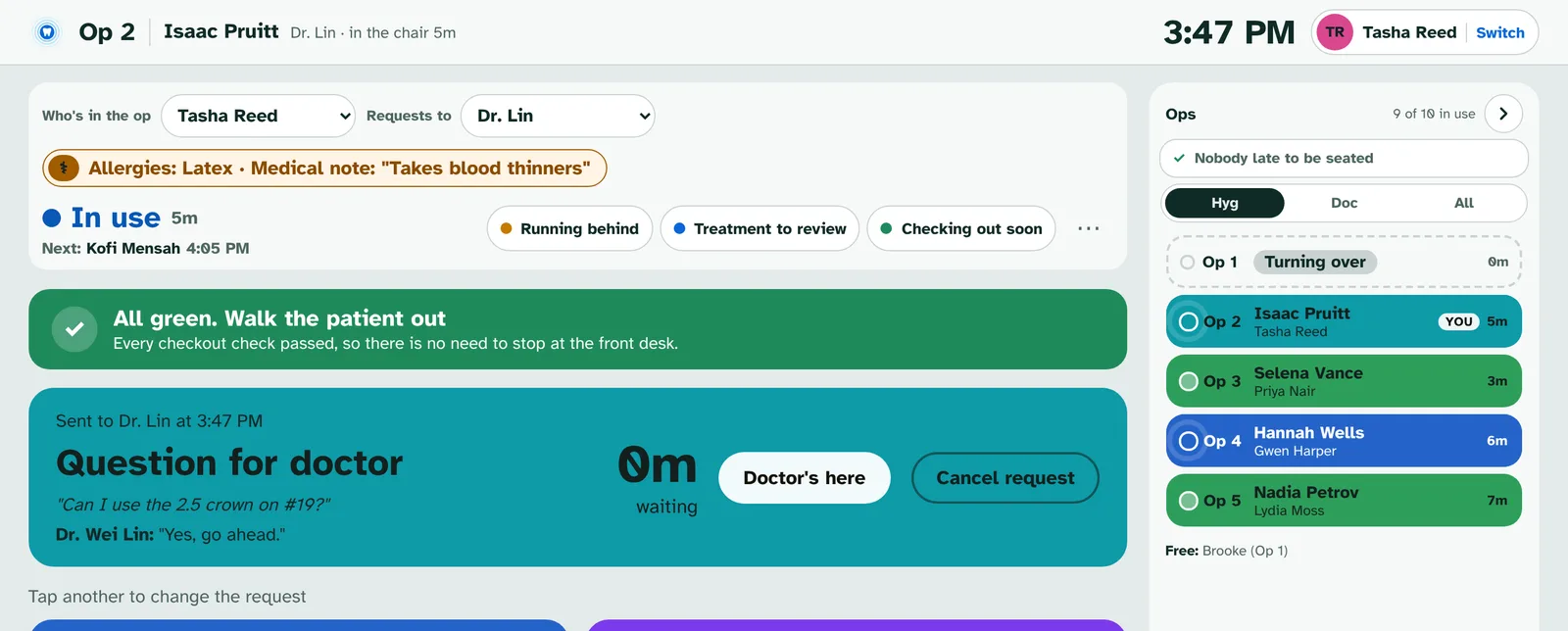
Op 2 tablet showing the sent question and Dr. Wei Lin's answer
An answered question on the op tablet. The same answer reaches the sender's phone and Windows.
New in 2.3

Windows notifications on every screen

Every ping that shows as a card also shows in the Windows corner, so it can't hide behind Open Dental.

  • Need help, quick buttons, checkout jobs, doctor requests, Next patient is here, Running behind and chat
  • The same buttons right on the notification: I'm coming, Can't right now, On my way
  • When someone answers first it turns into a quiet "Kayla is coming"
  • Only when VisitPing isn't the window in front, unless you pick Always

VisitPing · Front desk
Op 6 needs helpSent by Carmen Diaz
I'm comingCan't right now
VisitPing · Op 2
Dr. Lin is comingOn my way · by 11:12
VisitPing · Front desk
Kayla is comingSomeone answered first
New in 3.0.1

You hear it when someone answers

When the doctor taps On my way or answers a question, the person who asked hears it, and so does everyone working in that op today.

  • On their phone, Apple Watch and Windows
  • "Dr. Lin answered your question", Tap to read
  • I'm coming on Need help and I'll take them on front desk jobs come back the same way
  • Nobody hears an answer they gave themselves
Op 2 tablet showing the sent question and Dr. Wei Lin's answer
New in 3.0

Wait alerts, with leads

A patient waiting too long tells the people closest to them first, then that area's lead, then the office manager.

  • 15 minutes in the lobby, 10 ready for the doctor, 5 for checkout, sooner for new patients and medical alerts
  • I'm on it stops it for everyone and shows on the Office Board
  • Can't right now and Snooze 5 take it off one person's screens
  • Pick each lead and a backup under People
Office Board with patients in On my way, Arrived, Paperwork, In bathroom and Ready to go back, and the ops list on the right with Op 1 turning over and Op 5 waiting on Ready for exam.

Sounds and phones

Loud enough to notice, quiet enough to work.

Chimes for everything

Built-in chimes for each kind of alert, and your own MP3 or WAV sounds.

iPhone and Apple Watch

Add VisitPing to the home screen and alerts arrive even when it's closed. Tap to answer.

Android

Urgent alerts buzz long-short-long and stay until answered, with buttons on the notification.

Only the right people

Everyone in a room gets its Next patient alert, and nobody gets an alert they sent.

No alerts while Away

Step away and your pings go to the next person.

Never a patient's name

Notifications name the op or room, what's needed and who sent it.

See it running

Try the live demo. Nothing to install.

Brookside Family Dental is a made-up office that runs a busy day around the clock: patients arrive, rooms call the doctor, the front desk checks people out and the team chats. Pick how many ops and people you want, then take the 5-minute tour.

  • Works on a computer, tablet or phone
  • Tap any name to sign in, no PIN
  • Made-up patients only
Open the live demo demo.visitping.com

Ready when you are.

Every feature free for 30 days on your own Open Dental server. No card needed.

Start free trial